Inside the PMax Black Box: A Data Scientist's Guide to Algorithmic Budget Control
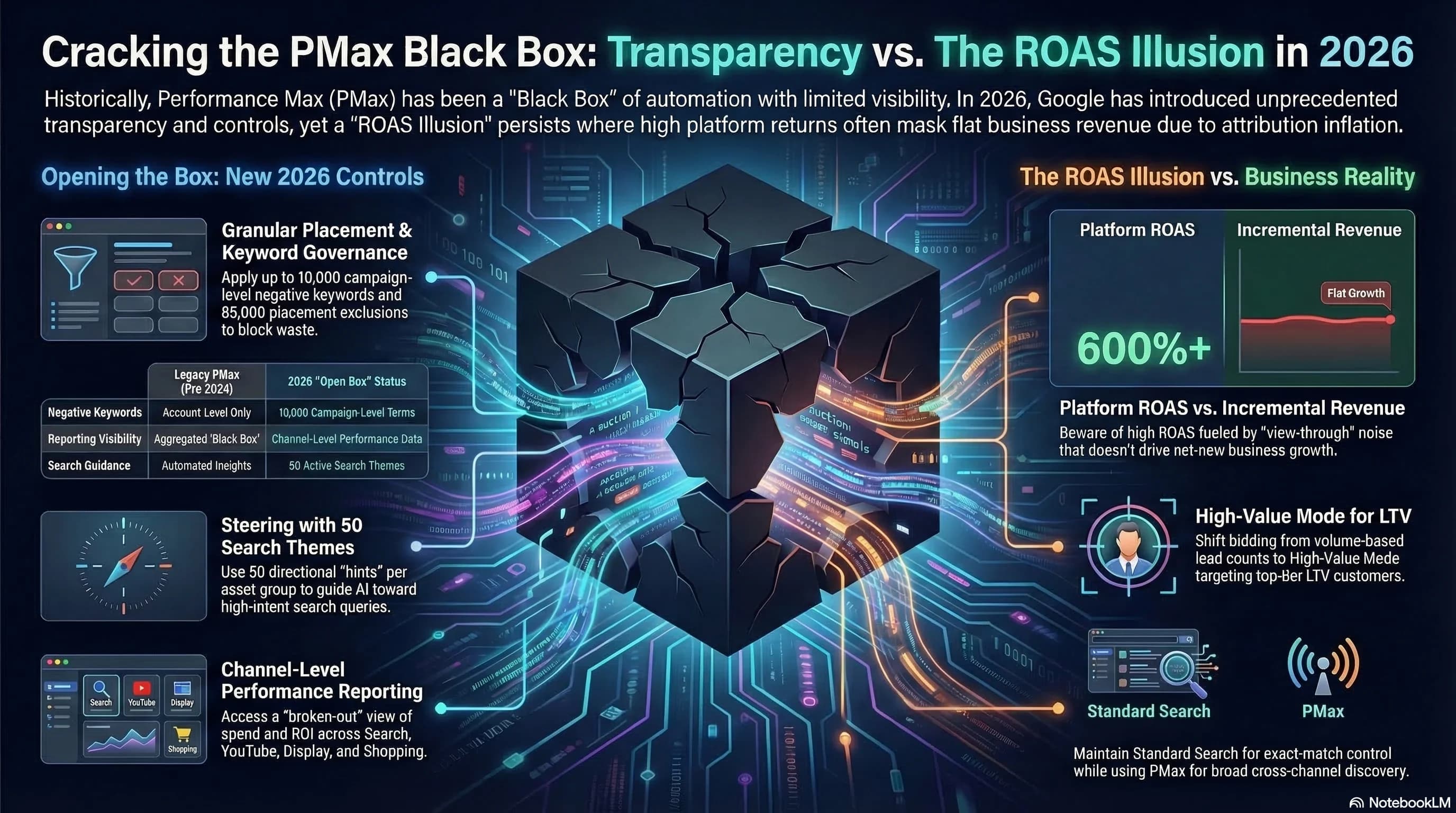
Most advertisers treat Performance Max like a vending machine. Put budget in, get conversions out, adjust if something looks wrong. The problem is that when something looks wrong in PMax, the dashboard usually does not show it. ROAS looks strong. Conversion volume is healthy. Backend revenue is flat.
This happens because PMax is not optimizing for your business goals. It is optimizing for the objective you defined, using whatever inventory and audience signals make that objective easiest to hit. Without strict guardrails, the path of least resistance is retargeting users who were already going to convert and serving auto-generated creative in low-quality inventory to satisfy spend requirements.
Understanding how the algorithm actually makes decisions is the difference between an account that produces incremental growth and one that produces impressive-looking waste.
If you have not yet addressed the foundational signal architecture problems that make PMax optimization possible, start with The $1,127 Algorithmic Tax, which covers conversion tracking maturity, Value-Based Bidding setup, and the audit checklist every account needs before making campaign-level changes.
Set and Forget Is Dead
The "set and forget" approach worked when campaign management was about bid adjustments and keyword lists. It does not work when the system is an AI model making real-time decisions across Search, YouTube, Display, Discover, Gmail, and Maps simultaneously.
In 2026, AI no longer assists your strategy. It executes it. Every input you provide, including the inputs you do not consciously provide, is a bidding instruction. Ad Strength ratings, asset variety, audience signals, conversion values, budget levels: these are not suggestions or best practice checkboxes. They are parameters that define which auctions the model is allowed to enter and how aggressively it bids.
Leave those parameters undefined or misconfigured and the model defaults to whatever produces the cheapest conversions. That usually means existing customers, branded searches, and display inventory with negligible purchase intent. The algorithm is not malicious. It is mathematical. It finds the path to your objective that requires the least effort. Your job is to make the easy path align with your actual business goals.
The Ad Strength Trap
Ad Strength is the metric Google uses to tell you whether your asset coverage is sufficient for the algorithm to work properly. Most accounts sit at Good and treat that as acceptable. It is not.
Moving an asset group from Good to Excellent produces a measurable 6% conversion uplift. That is not the main concern. The main concern is what happens when assets are missing entirely.
When you fail to provide specific asset types, PMax does not pause those placements. It fills the gap using Google's generative AI models. Missing vertical video is the most common and most damaging version of this problem. The system uses Veo to animate your static images into auto-generated video assets and pushes them into YouTube Shorts inventory to satisfy spend requirements.
These auto-generated assets are not optimized for your brand, your offer, or your audience. They are generated to fill an inventory slot. The result is high CPM placements with negligible engagement that dilute your signal quality and degrade your brand's visual consistency at scale.
The same principle applies to image and text assets. Without 15 unique headlines, the algorithm hallucinates copy to match query intent. Without high-quality images, it generates synthetic variations that trigger high-cost placements with low purchase intent.
| Missing Asset Type | System Response | Business Impact |
|---|---|---|
| Vertical Video | Veo animates static images for YouTube Shorts | High CPM, low engagement, brand dilution |
| High-Quality Images | AI generates synthetic variations | High-cost placements, weak signal quality |
| Full Text Variations | AI hallucinates headlines to match queries | Loss of control over messaging, intent mismatch |
The fix is straightforward: build complete asset coverage before launching. Provide vertical video (9:16 ratio, minimum 10 seconds), at least 5 high-quality images in multiple aspect ratios, 15 unique headlines, 4 descriptions, and 5 sitelinks. This is not creative abundance for its own sake. It is the minimum viable input set for the algorithm to function without filling gaps with generated content you did not approve.

Smart Bidding Exploration: When to Use It and When to Avoid It
Smart Bidding Exploration is a feature that temporarily lowers your ROAS target to allow the algorithm to explore query categories it would normally consider too expensive or too uncertain. The premise is that short-term margin compression buys long-term scale by discovering new high-intent audience segments.
This is only a viable strategy under specific conditions.
Use Smart Bidding Exploration if your account generates 50 or more weekly conversions, you have clear margin data that quantifies how much ROAS compression you can absorb, and you have a defined window for the experiment with a clear threshold for reverting. In this environment, the algorithm has enough signal history to make reasonable bets on unfamiliar query territory.
Do not use Smart Bidding Exploration on accounts with fewer than 50 weekly conversions, low-margin businesses where any ROAS compression affects viability, or accounts already in a learning phase from a recent campaign change. In a low-data environment, exploration does not find hidden opportunities. It spends budget on unproven, low-intent queries while your core campaigns are starved of signal data. This is how accounts enter a performance death spiral that takes months to exit.
High Value Mode is a related feature that increases bids for users the algorithm predicts will have high lifetime value. It requires enabling "Bid more for new customers" and only produces reliable results on accounts with deep conversion history. The algorithm needs a substantial baseline of customer data to make accurate LTV predictions. Without it, High Value Mode bids aggressively on users based on weak predictions, which raises CPCs without improving conversion quality.
Audience Signals Are Training Data, Not Targeting Parameters
This is the most widely misunderstood element of Performance Max. Audience signals do not restrict who sees your ads. They tell the algorithm where to start learning.
Without audience signals, PMax enters a 2 to 4 week learning phase where it explores broadly to identify who converts. During this period, your budget is funding the algorithm's education. Some of that exploration will produce conversions. A significant portion will not. You are paying for the algorithm to figure out what you could have told it before launch.
With strong audience signals, the algorithm skips most of that exploration. It starts from a profile of your known converters and expands from there. The difference in budget efficiency during the first month of a campaign is substantial.
The hierarchy of signal quality matters:
Customer Match lists are the strongest signal available. Uploading your existing customer data from CRM bypasses the learning phase almost entirely. The algorithm matches your customer list against Google's user graph, builds a statistical profile of your converters, and begins bidding against lookalike users immediately. This is the only signal type that gives the algorithm a direct answer to the question "who are my best customers?"
Website Visitors capture intent signals from your existing ecosystem. Users who have visited your site, especially those who reached high-intent pages like pricing or case studies, provide a behavioral profile of users considering your offer.
Custom Intent Audiences built from recent search behavior give the algorithm a keyword-based approximation of purchase intent. These are useful when Customer Match data is limited.
First-party data is not just the best signal. It is the only signal your competitors cannot replicate. Broad match, AI Max, and automated audience expansion give every account access to the same query and behavioral inventory. The only genuine competitive moat in an AI-driven auction environment is the proprietary data about your customers that no amount of spend can buy.
Intent Guardrails: Stopping Budget Leakage Before It Starts
PMax has a structural retargeting bias. The algorithm seeks the path of least resistance to a conversion. Existing customers and branded searchers are the easiest conversions to find. They have already demonstrated intent and are likely to convert with minimal additional persuasion. Left unmanaged, PMax will systematically allocate spend toward this traffic, generate strong-looking ROAS, and drive zero incremental new customer acquisition.
This is the Attribution Inflation problem. The campaign looks profitable. The business is not growing.
Three audit checks diagnose and fix this:
Search Network Performance Report
Navigate to Insights and reports, then find the Search terms report. This shows you the actual queries your PMax campaign is matching against. Look for branded terms, competitor queries, and navigational searches that should be handled by dedicated campaigns. If PMax is capturing these, it is inflating its ROAS with traffic that did not require advertising to convert.
Account-Level Placement Exclusions
PMax will serve display and video inventory across a wide range of placements, including low-quality mobile app inventory and irrelevant websites. These placements rarely convert and consistently consume budget. Apply account-level placement exclusions to block junk app categories (games, utilities, entertainment apps with no relevance to your offer) and domains that have historically produced zero conversions. This is not a set-once operation. Review placement data monthly and add exclusions as new low-quality inventory appears.
Brand List Exclusions
Build a brand exclusion list and apply it at the PMax campaign level. This forces branded queries into your dedicated branded search campaigns where they belong. Branded searches should be captured at lower CPC with higher relevance scores. When PMax captures them instead, it claims credit for conversions that your brand campaign would have won at a fraction of the cost. The ROAS calculation looks good because the cost of acquiring a brand converter is low and the conversion rate is high. The incremental value is near zero.
The 2026 Power Pack: Building a Multi-Campaign Architecture
Running a single PMax campaign and expecting it to manage your entire funnel is the structural equivalent of asking one employee to handle sales, marketing, and customer service simultaneously. The work gets done, but nothing gets done well.
A healthy account architecture in 2026 uses three campaign types in defined roles, each optimized for a specific stage of the purchase journey.
Demand Gen operates at the awareness layer. YouTube and Discover placements with immersive visual creative. The objective here is not conversions. It is introducing your brand to users who match your high-LTV customer profile but have not yet entered active consideration. Demand Gen campaigns should be evaluated on brand search volume lift and assisted conversion attribution, not last-click ROAS.
AI Max for Search captures active purchase intent. Search Term Matching and URL Expansion allow the campaign to reach relevant queries beyond your exact keyword list while maintaining tighter control than PMax's cross-channel scope. Brand Settings in AI Max let you specify how your brand name is used in ad copy, preventing misrepresentation. This campaign wins the auction when a user is actively searching for what you sell.
Performance Max operates at full-funnel scale across all Google properties simultaneously. With proper audience signals, asset coverage, and brand exclusions in place, it functions as an amplifier that finds conversion opportunities the Search campaign cannot reach. Without those guardrails, it cannibalizes your other campaigns and inflates reported performance.
The Investment Strategy Tool that appears in PMax recommendations suggests budget allocation based on which campaigns are "capped by budget." This is a budget-sink metric. A campaign being capped by budget is not evidence that more budget will produce proportional returns. Evaluate budget allocation on actual ROI efficiency against your Target CPA and Target ROAS thresholds, not on Google's headroom suggestions.
For the broader context of how AI-driven search is changing what happens before a user reaches your ads, The SEO Roadmap for 2026 covers how organic visibility and paid search increasingly operate on the same signal infrastructure.
Auditing for Hidden Waste: The Post-Mortem Framework
When ROAS looks strong and revenue growth is flat, a technical post-mortem is required before making any optimization changes. Changing bids or budgets on a campaign running corrupted signal data produces unpredictable results. Fix the data first.
The post-mortem has four stages:
Verify conversion data integrity. Check Repeat Rate on your primary conversion actions. Check that Enhanced Conversions are hashing correctly using SHA-256 with normalized email addresses. Verify that your conversion window matches your actual purchase cycle. A 30-day conversion window on a product with a 90-day consideration cycle will undercount conversions and cause the algorithm to underbid.
Audit asset performance. Review Asset Details for every asset group. Identify Low-rated assets that have been in that status for more than three weeks. Check whether auto-generated assets are active. If they are, replace them with approved creative and disable auto-generation where the option is available.
Review placement data. Export the placement report for the last 90 days. Filter for placements with more than 100 impressions and zero conversions. Add these to your account-level exclusion list. Calculate the budget recovered and reallocate it to placements with demonstrated conversion history.
Examine audience overlap. Check whether your PMax audience signals include existing customers without an explicit exclusion list for suppression. If existing customers are receiving acquisition-focused ads, your new customer cost metrics are being diluted by retention conversions that required no advertising to occur.
The Google Ads interface is designed to surface green ratings and positive metrics. Excellent Ad Strength, strong impression share, rising conversion volume. These signals are optimized to encourage continued spend, not to accurately represent whether your advertising is driving incremental business growth. Algorithm Observability means building the discipline to look past those signals and interrogate the underlying data.
You are not managing bids. You are architecting the signal environment that determines what the algorithm does with your budget. Every configuration decision, every asset you provide or fail to provide, every audience signal you include or exclude, is an instruction to a goal-seeking engine with no judgment about what actually constitutes a good outcome for your business.
Define that outcome precisely. Enforce it with guardrails. Audit it continuously.
Frequently Asked Questions
What is Performance Max retargeting bias and how do I fix it? PMax preferentially finds users who were already going to convert because they are the easiest path to a conversion event. This inflates reported ROAS while driving minimal new customer acquisition. Fix it by adding brand exclusions at the campaign level to force branded queries to your dedicated branded search campaign, uploading your existing customer list as a suppression audience so PMax stops serving acquisition ads to people who already bought, and reviewing your Search Terms report monthly to identify and exclude easy retargeting traffic.
Why is my PMax campaign generating auto-created video ads? When you do not provide vertical video assets, Performance Max uses Google's Veo model to animate your static images and deploys the results in YouTube Shorts inventory. These auto-generated assets are not optimized for your brand or offer. They are generated to fill an inventory slot. Provide native vertical video assets (9:16 format, minimum 10 seconds) to prevent this. You can also submit a request through the Google Ads Help Community to disable auto-generated video, though this option is not available through the standard interface.
When should I use Smart Bidding Exploration? Only when your account generates 50 or more weekly conversions, you have defined the ROAS compression range you can absorb, and you have a clear reversion threshold. Smart Bidding Exploration lowers your ROAS target temporarily to explore unfamiliar query categories. In low-data accounts, it spends budget on unproven traffic without enough conversion history to evaluate whether those queries have potential. The result is budget waste and signal dilution, not discovery.
What audience signals should I use in Performance Max? In order of effectiveness: Customer Match lists from your CRM (strongest signal, bypasses the learning phase), website visitors segmented by high-intent pages (pricing, case studies, demo requests), and custom intent audiences built from purchase-related search behavior. First-party data is the only competitive moat in an AI-driven auction environment because it reflects knowledge about your specific customers that no competitor can replicate through automated targeting.
What is the Power Pack campaign structure for Google Ads in 2026? A three-campaign architecture where each campaign has a defined role: Demand Gen for awareness on YouTube and Discover, AI Max for Search to capture active purchase intent queries, and Performance Max for full-funnel scale across all Google properties. Running PMax in isolation without Demand Gen upstream and a dedicated Search campaign alongside it results in PMax trying to do everything, which means it defaults to the easiest conversions rather than operating efficiently at each funnel stage.
How do I know if my Performance Max campaign is cannibalizing my branded search? Check your Search Terms report and filter for queries containing your brand name. If branded terms are appearing in PMax, the campaign is capturing traffic your branded search campaign should be winning at lower CPC and higher relevance. Add your brand terms as exact-match exclusions at the PMax campaign level and build a dedicated branded search campaign if you do not already have one. Monitor your branded search CPC before and after the exclusion to verify the fix is working.
Sources
- Google Ads Help — About Audience Signals for Performance Max Campaigns
- Google Ads Help — Best Practices for Asset Groups in Performance Max Campaigns
- Google Ads — Best Practices for Performance Max Lead Generation
- Google Ads — Unlock More Visibility and Control in Performance Max
- Google Ads Help — Value-Based Bidding Best Practices
- Search Engine Land — Google Search Ads in 2026 Require a Different Kind of Audit
- Optmyzr — How to Optimize Performance Max in 2026
- Nils Rooijmans — Performance Max: Disable Automatically Created Videos
- BlueAlpha — Why You Still Shouldn't Fully Trust PMax