The 24/7 Burn: Why Your Always-On Google Ads Strategy Is Leaking 20% of Your Budget
Google's default recommendation is 24/7 ad delivery. This is not strategic advice. It is a structural setting that benefits Google's revenue targets by spreading your budget across the full day regardless of whether the traffic generating spend at 3 AM has any resemblance to the traffic that actually converts.
The auction is not a uniform environment. Conversion rates across a 24-hour cycle vary by 3 to 5 times between peak and off-peak windows. An always-on account dilutes its bidding power by distributing capital across low-intent, high-bot-traffic dead hours while competing for the same budget against the same high-intent queries that convert during the workday.
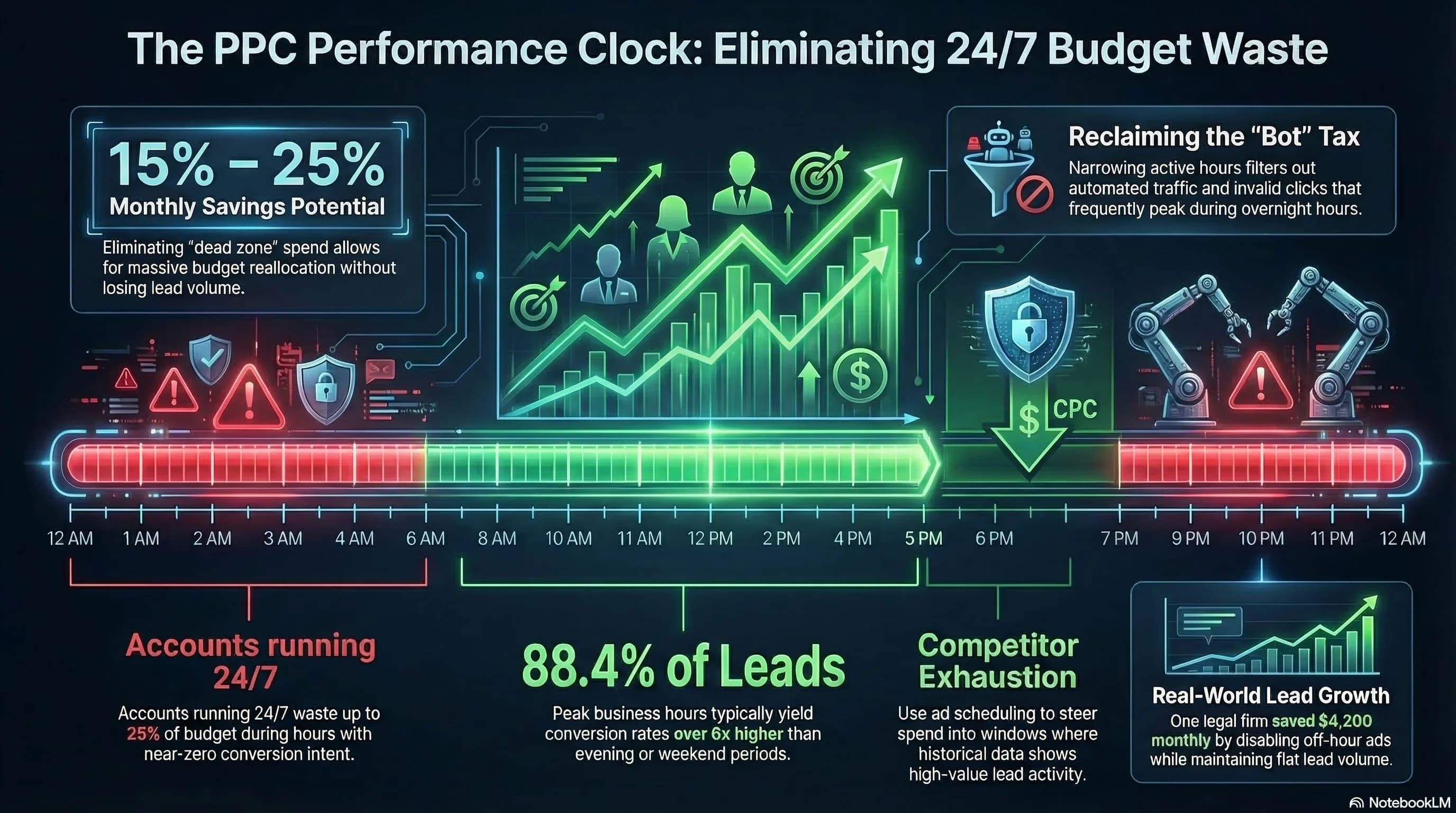
The quantitative case for temporal optimization is specific. In B2B accounts, approximately 10.8% of total budget is consistently wasted in dead zones: the late-night window from midnight to 5 AM and the late evening window from 8 PM to 11 PM. These windows produce zero qualified conversions in most B2B categories. Conversely, the golden window from 8 AM to 4 PM drives 88.4% of all leads while consuming only 72.5% of the total budget.
The math is unambiguous. Reallocating the 10.8% dead zone budget to the golden window does not just stop the waste. It funds more impression share during the hours when conversion probability is highest, which compounds the efficiency advantage.
For the broader signal quality framework that makes temporal optimization meaningful, The Pruning Protocol covers the complete weekly maintenance discipline that includes scheduling alongside keyword, creative, and placement optimization.
The Behavioral Reality Behind the Data
Understanding why conversion rates vary so dramatically by time of day prevents the mistake of applying B2B scheduling logic to B2C accounts and vice versa.
B2B intent follows the professional day. Decision-makers and procurement influencers research solutions during work hours when they have the screen real estate, the organizational context, and the institutional mandate to evaluate options. The 9 AM to 5 PM desktop-dominant window represents active professional research: specification comparison, vendor evaluation, case study review, RFP development. These users are on the clock and have a business reason to convert.
As the workday ends, B2B intent collapses. The same users who were active buyers at 2 PM become passive browsers at 9 PM. They are not evaluating vendors. They are unwinding. Their search behavior may superficially resemble research queries, but the psychological context that drives conversion decisions is absent.
Weekend B2B traffic shows a 51% higher cost per lead than weekday traffic, confirming that professional context is a prerequisite for B2B conversion, not just a preference.
B2C follows a different behavioral curve. Consumer categories do not share the B2B pattern. B2C and lifestyle brands experience what the data shows as an evening engagement spike: conversion rates increase as consumers browse and shop during weekday evenings. The 6 PM to midnight window in consumer categories represents the transactional tail of purchase journeys that began during the day. Users who researched on desktop during lunch finalize purchases on mobile in the evening.
This category-level difference means that B2B ad scheduling logic applied to a B2C account would eliminate some of the highest-converting hours. The temporal audit must be conducted on your specific account's data, not on industry generalizations.
The Desktop vs. Mobile Time Split
Device and time interact in ways that affect which campaigns to prioritize at different points in the day.
Research-intensive purchases in high-consideration categories show a clear split:
9 AM to 5 PM: Desktop dominance. This window accounts for 60% of research-intensive purchase decisions. Desktop sessions during work hours are longer, involve multi-tab comparison, and reflect active evaluation rather than browsing. Users are comparing technical specifications, reviewing warranty terms, and evaluating vendor credibility. These sessions require screen real estate and undivided attention that desktop provides.
6 PM to midnight: Mobile dominance. Mobile checkout share exceeds 60% in the evening. This is not a separate purchase journey. It is the transactional completion of research conducted on desktop earlier in the day or week. A B2B prospect who evaluated your solution on desktop during business hours may complete a demo request form on mobile from their couch at 8 PM.
This behavioral pattern has a specific implication for attribution. If your desktop conversion tracking is strong and your mobile conversion tracking is weak, you will see strong performance during business hours and apparently poor performance in the evening. The evening mobile sessions that are completing journeys initiated on desktop are invisible in the data. Before making aggressive dayparting decisions, verify your cross-device attribution is capturing the full journey.
The competitor exhaustion window. A tactical opportunity exists in the early evening, roughly 5 PM to 7 PM, in many categories. Most budget-constrained accounts exhaust their daily budgets during peak midday hours. This creates a reduced competition window in the early evening where CPCs drop as competing advertisers cap out. Operators with preserved budgets can capture high-intent conversions during this window at significantly lower cost per click than midday peak pricing.

The Temporal Performance Audit
Identifying your account's specific dead zones requires going beyond the standard dashboard view.
Navigate to the Google Ads Report Editor under Insights and Reports. Create a custom table segmented by Hour of Day and Day of Week. Pull 90 days of data: a single week's data has too much variance to drive structural changes. Anything less than 60 days produces unreliable conclusions.
Filter for time blocks where cost per acquisition exceeds 50% above your account average. These are your primary dead zone candidates. Cross-reference against conversion volume: a time block with high CPA and low conversion count is definitively a dead zone. A time block with high CPA and reasonable conversion volume is a candidate for bid adjustment rather than complete exclusion.
Four red flag patterns in the temporal data:
High spend, zero conversions, consistent pattern across multiple weeks. This is the cleanest dead zone signal. If a time block has never produced a conversion over 90 days despite consistent spend, it is bot traffic, accidental clicks, or off-intent browsing. Exclude it.
CPA greater than 2x account average. The traffic is converting, but at a cost that destroys margin. Investigate whether this is a persistent pattern or a recent anomaly before making scheduling changes.
High CTR, zero conversions. The behavioral signature of accidental clicks and automated traffic. Bot-generated clicks produce high CTRs without conversions. If this pattern appears in a specific time window, that window is generating fake engagement signals that contaminate your bidding model.
Weekend performance sharply below weekday for B2B. The 51% higher CPL on B2B weekends is an industry-wide pattern. Verify whether it holds in your specific account and, if so, whether weekend campaigns can be reduced without losing meaningful conversion volume.
Implementation: The Dayparting Toolkit
Once you have identified your dead zones through the temporal audit, three implementation mechanisms allow you to act on the findings.
Hard ad scheduling with -100% bid adjustments.
In Google Ads, navigate to Campaign Settings, then Ad Schedule. Build a schedule that excludes your confirmed dead zones completely using -100% bid adjustments. This is not a mild reduction. It is a complete withdrawal from the auction during those windows.
The platform limits you to six bidding blocks per day in the standard interface. For most accounts, six blocks are sufficient to define your golden window and exclude your dead zones. The schedule should be built from 90 days of audit data, not assumptions. If your data shows the dead zone beginning at 7 PM rather than 8 PM, your schedule should reflect your data.
Aggressive bid modifiers for peak windows.
Apply +50% to +100% bid modifiers during your highest-converting time blocks. The objective is to maintain top-of-page position during the golden window when conversion probability is highest and competition for the same inventory is most intense. The budget freed from dead zone elimination funds these peak modifiers without increasing total spend.
Script-based hour-by-hour automation.
For accounts with sufficient data and technical resources, JavaScript-based Google Ads scripts bypass the six-block daily limit and enable granular hour-by-hour bid adjustments that respond to real-time auction volatility. The Pemavor bid adjustment script and similar tools allow bid changes at the hourly level rather than the six-block level, which is particularly valuable in categories where conversion probability shifts significantly within a single four-hour block.
Scripts also provide monitoring capabilities: budget pacing alerts, anomaly detection when spend patterns deviate from historical norms, and automated reporting on temporal performance that reduces the manual audit burden.
Smart Bidding and Temporal Optimization
Smart Bidding theoretically accounts for time-of-day signals automatically. The algorithm evaluates the probability of conversion at each auction and adjusts bids accordingly. In accounts with sufficient conversion volume, this is partially true.
The limitation is data density. Smart Bidding requires 15 to 30 conversions per month to identify temporal patterns effectively. Below this threshold, the algorithm does not have enough signal to differentiate between a 2 AM auction and a 10 AM auction in the same campaign. It applies similar bids to both based on insufficient data, effectively ignoring the temporal conversion rate differential.
For low-volume campaigns where Smart Bidding cannot learn temporal patterns, manual ad scheduling is the only mechanism to implement temporal optimization. For high-volume campaigns where Smart Bidding has sufficient data, manual scheduling still adds value by enforcing hard exclusions during windows where even low bids produce no meaningful conversions.
The two approaches are not mutually exclusive. Smart Bidding + manual ad scheduling with -100% exclusions during confirmed dead zones is the correct configuration for most accounts. Let the algorithm optimize within the auction windows you define. Do not let it optimize within windows that produce only bot traffic and zero conversions.
The LinkedIn Ads Scheduling Problem
LinkedIn Ads presents a distinct temporal optimization challenge that deserves specific attention for B2B operators.
LinkedIn lacks native ad scheduling. The platform resets daily budgets at midnight UTC, which forces spend during US off-hours (midnight to 8 AM ET) when B2B decision-makers are not active. A B2B SaaS account targeting US professionals on LinkedIn is spending budget reaching nobody of significance during the first eight hours of its daily budget cycle.
The consequence is a 20 to 30% budget leak as the platform distributes spend evenly across a 24-hour cycle that includes 8 hours of essentially zero relevant audience activity. LinkedIn visibility drops 38% for the same spend cost during off-peak US hours.
Manual toggling of LinkedIn campaigns to pause during off-hours is operationally unsustainable and prone to human error. Third-party automation tools that integrate with LinkedIn's API can enforce scheduling constraints the native platform does not support. The implementation requires connecting the automation tool to your LinkedIn Ads account and defining the workday schedule you want enforced.
The alternative is accepting the LinkedIn scheduling limitation as a cost of doing business on the platform and accounting for the 20 to 30% budget leak in your LinkedIn ROAS benchmarks. Given LinkedIn's unique B2B targeting capabilities (job title, company size, industry seniority), the 20 to 30% scheduling inefficiency may still produce acceptable overall ROAS for accounts where LinkedIn's targeting precision is the priority.
The Overblocking Warning
Temporal optimization has a failure mode: applying B2B scheduling patterns too aggressively to accounts where evening or weekend traffic contributes meaningful conversion volume.
The goal is to eliminate bot traffic and confirmed zero-conversion windows. It is not to eliminate any window that does not match your industry benchmark for peak hours. Your account data is the authority, not the industry pattern.
Before applying any ad scheduling exclusion, verify that the time window being excluded has produced zero or near-zero conversions over 90 days in your specific account. If evening traffic in your account converts at half the rate of peak hours but still converts meaningfully, the correct response is a bid reduction, not a complete exclusion. Removing that window entirely eliminates conversions that have real value, just at a less efficient rate.
The algorithm also needs sufficient auction volume to learn effectively. If scheduling is too narrow, Smart Bidding cannot find enough auctions to develop reliable conversion probability predictions. The minimum viable scheduling window for Smart Bidding to function properly is typically 8 to 10 hours per day. Tighter schedules risk algorithmic underperformance from insufficient data.
Frequently Asked Questions
What is dayparting in Google Ads and how does it work? Dayparting, or ad scheduling, allows you to control when your ads are eligible to show by time of day and day of week. You set bid adjustments for specific time blocks ranging from -100% (complete exclusion) to +900% increase. A -100% adjustment during a specific time window prevents your ads from appearing at all during those hours. Positive adjustments increase your bid competitiveness during high-value windows. Use the Google Ads Campaign Settings menu and Ad Schedule tab to configure your schedule.
How much budget is typically wasted during dead zone hours in B2B Google Ads? Industry audit data consistently shows approximately 10.8% of B2B Google Ads budget consumed by the late-night (midnight to 5 AM) and late evening (8 PM to 11 PM) windows, which produce zero qualified conversions in most B2B categories. These windows are dominated by bot traffic, accidental clicks, and off-intent browsing. Reallocating that budget to the 8 AM to 4 PM golden window can improve ROAS by 15 to 20% without any changes to keywords, creative, or bidding strategy.
Does Smart Bidding eliminate the need for ad scheduling? No. Smart Bidding adjusts bids in real time based on conversion probability signals, which theoretically include time-of-day patterns. However, Smart Bidding requires 15 to 30 monthly conversions to identify temporal patterns reliably. Below this threshold, it cannot differentiate between a 2 AM auction and a 10 AM auction. Even above the threshold, Smart Bidding cannot enforce complete exclusions during windows that produce only bot traffic and zero conversions. Manual ad scheduling with -100% exclusions for confirmed dead zones is additive to Smart Bidding, not redundant with it.
What is the golden window for B2B Google Ads and when is it? The golden window for B2B search advertising is approximately 8 AM to 4 PM on weekdays. This window drives 88.4% of qualified B2B leads while consuming only 72.5% of total budget in well-audited accounts. The behavioral explanation is professional context: B2B decision-makers research solutions during work hours when they have organizational mandate and institutional context to evaluate vendors. Weekend B2B CPL runs 51% higher than weekday, confirming that professional context is a conversion prerequisite.
Why does conversion rate drop so much in the evening for B2B accounts? The evening conversion rate drop in B2B reflects the shift from professional research mode to personal browsing mode. The same users who were active buyers during work hours become passive browsers after the workday. Their search behavior may produce B2B-relevant queries, but the psychological and institutional context that drives purchase decisions is absent. They are not evaluating vendors. They are unwinding. The intent signal looks similar. The conversion probability is dramatically lower.
How do I find the dead zones in my specific Google Ads account? Navigate to the Google Ads Report Editor under Insights and Reports. Create a custom table segmented by Hour of Day and Day of Week. Pull 90 days of data. Filter for time blocks where cost per acquisition exceeds 50% above your account average, then cross-reference against conversion volume. Time blocks with consistent high spend and zero conversions over 90 days are your dead zones. Do not make scheduling decisions based on less than 60 days of data. Short-window data has too much variance to drive structural changes.
Sources
- Google Ads Help — About Bid Adjustments
- Google Ads Help — Your Guide to Smart Bidding
- WordStream — Google Ads Scheduling (Dayparting) in 5 Steps
- Growth Spree Official — Google Ads Day and Time Performance Analysis
- Growth Spree Official — LinkedIn Ads Has No Ad Scheduling and It's Costing You More Than You Think
- SureBright — 24-Hour E-Commerce Trends: How Shoppers Time Big-Ticket Buys
- Metric Hub — Dayparting Bidding and Google Ad Scheduling
- Negator — 7 Scenarios Where Manual Bidding Beats Google Smart Bidding